
সাহায্য
কোথাও আটকে গেছেন?
ইমেইল করুন: hello@biteit.pro
যে ইমেইল দিয়ে অ্যাকাউন্ট খুলেছেন সেখান থেকে লিখুন, আর কোন ফোন ব্যবহার করছেন জানান। তাহলে এক বারেই সমাধান করে দিতে পারব।
ওয়েবসাইট থেকে কিনলে: কেনা থেকে সাইন ইন পর্যন্ত
biteit.pro থেকে কেনা প্রিমিয়াম চালু হয় আপনার দেওয়া ইমেইলের অ্যাকাউন্টে। অ্যাপে নতুন করে কিছু কিনতে হয় না, শুধু ওই ইমেইল দিয়ে সাইন ইন করুন।
-
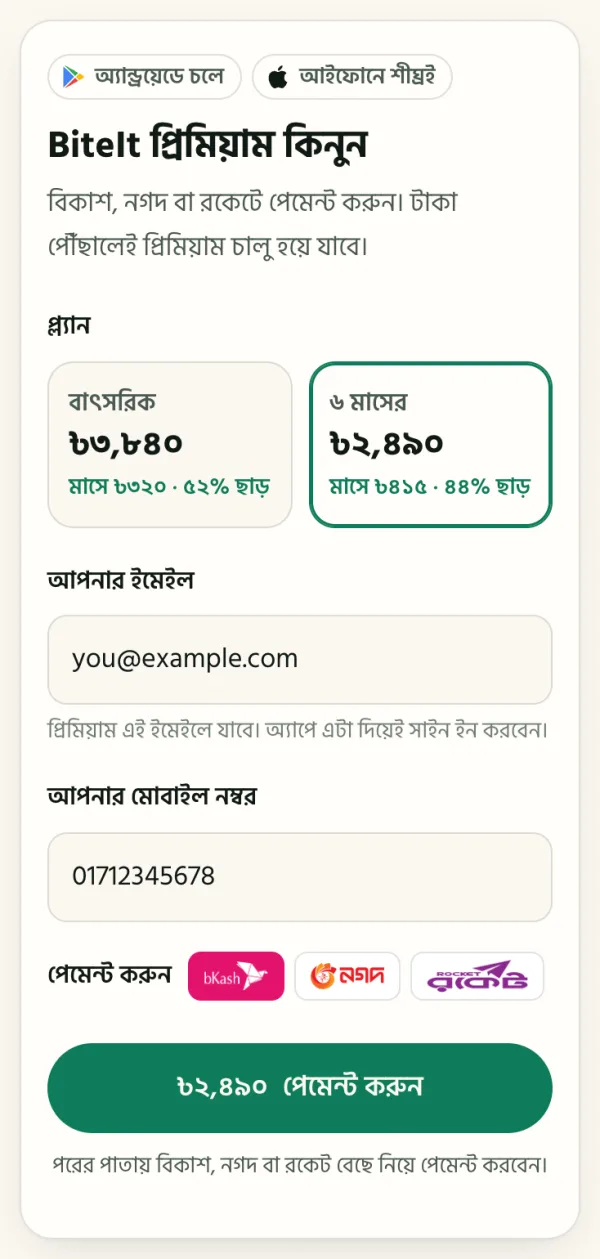
১. প্ল্যান বাছুন, ইমেইল আর মোবাইল নম্বর দিন
biteit.pro-তে দামের নিচে কিনুন চাপুন। যে ইমেইল দিয়ে অ্যাপে ঢুকবেন সেটা লিখুন, বানান মিলিয়ে নিন। প্রিমিয়াম এই ইমেইলেই যাবে। সাথে আপনার মোবাইল নম্বরটাও দিন। তারপর পেমেন্ট করুন চাপুন।
-
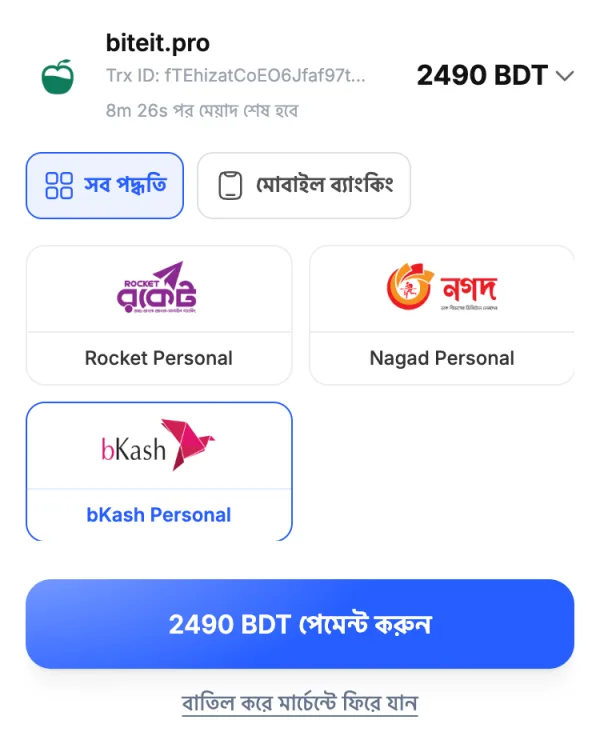
২. বিকাশ, নগদ বা রকেট বেছে নিন
এরপর খুলবে আমাদের পেমেন্ট পাতা, biteit.paymently.io। ওয়ালেট বেছে নিয়ে নিচের পেমেন্ট বোতাম চাপুন। পাতাটা ২০ মিনিট খোলা থাকে, তাই ওয়ালেটের ফোনটা হাতের কাছে রাখুন।
-
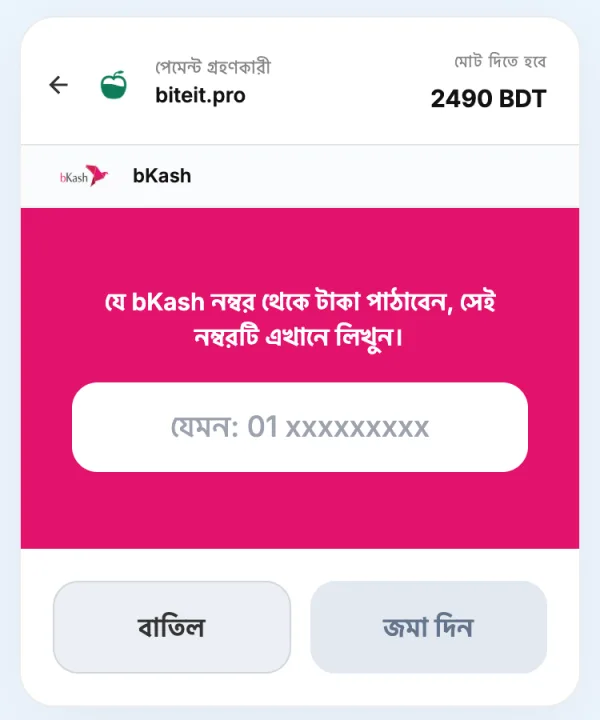
৩. টাকা পাঠান
যে নম্বর থেকে টাকা পাঠাবেন সেটা লিখে জমা দিন চাপুন। এরপর পাতায় যেভাবে বলা আছে সেভাবে টাকা পাঠান। কোন নম্বরে আর কত টাকা, সব ওখানেই লেখা থাকে। পেমেন্ট শেষে আপনি BiteIt-এর পাতায় ফিরে আসবেন।
-
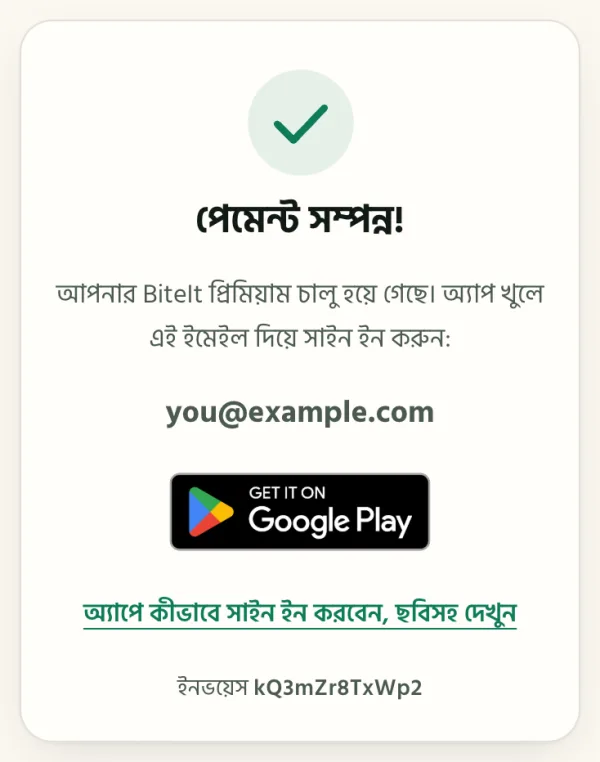
৪. “পেমেন্ট সম্পন্ন!” দেখুন
এটা দেখা মানেই প্রিমিয়াম চালু। এখানে যে ইমেইল দেখাচ্ছে, অ্যাপে সেটা দিয়েই সাইন ইন করবেন।
“পেমেন্ট মিলিয়ে দেখা হচ্ছে” দেখালে একটু অপেক্ষা করুন। মিলে গেলেই প্রিমিয়াম নিজে থেকে চালু হয়ে যায়, পাতাটা বন্ধ করে দিলেও। দেরি হলে ওই পাতাতেই TrxID পাঠিয়ে দিন, WhatsApp-এ আমাদের কাছে চলে আসবে।
-
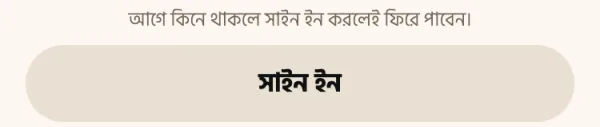
৫. অ্যাপ খুলে “সাইন ইন” চাপুন
গুগল প্লে থেকে BiteIt ইনস্টল করে খুলুন, শুরুর প্রশ্নগুলোর উত্তর দিন। সাবস্ক্রিপশনের পাতায় এলে নিচের সাইন ইন বোতাম চাপুন।
“ফ্রি ট্রায়াল শুরু করুন” চাপবেন না। ওটা গুগল প্লে-তে আলাদা একটা সাবস্ক্রিপশন শুরু করে।
-
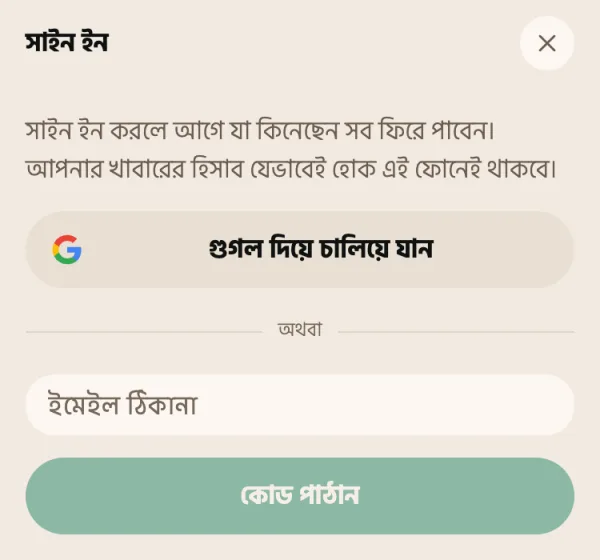
৬. কেনার ইমেইল দিয়েই সাইন ইন করুন
কেনার ইমেইলটা যদি ফোনের গুগল অ্যাকাউন্ট হয়, গুগল দিয়ে চালিয়ে যান চাপুন আর ঠিক ওই অ্যাকাউন্টটাই বাছুন।
নাহলে ইমেইলটা লিখে কোড পাঠান চাপুন, ইমেইলে আসা ৬ সংখ্যার কোডটা দিয়ে মিলিয়ে দেখুন চাপুন। ব্যস, প্রিমিয়াম চালু। পরে নতুন ফোনেও এভাবে সাইন ইন করলেই প্রিমিয়াম ফিরে আসবে।
সাবস্ক্রিপশন আর সাইন ইন
টাকা দিয়েছি, তবু অ্যাপ বারবার পেওয়াল দেখাচ্ছে।
আপনার সাবস্ক্রিপশন থাকে যে অ্যাকাউন্টে সাইন ইন করে কিনেছিলেন তার সাথে, ফোনের সাথে না। পেওয়ালে সাইন ইন চাপুন, আর যে ইমেইল দিয়ে কিনেছিলেন সেটাই দিন।
গুগল দিয়ে সাইন ইন করে কিনে থাকলে আবার গুগল দিয়েই ঢুকুন, আর ঠিক সেই গুগল অ্যাকাউন্টটাই বাছুন। ফোনে কয়েকটা অ্যাকাউন্ট থাকলে মাঝে মাঝে অন্যটা চলে আসে।
biteit.pro থেকে কিনে থাকলে ওখানে যে ইমেইল লিখেছিলেন সেটাই দিন। ছবিসহ ধাপে ধাপে নিয়ম ওপরে আছে।
সাইন ইন কোড আসছে না।
আগে স্প্যাম বা প্রোমোশনস ফোল্ডারটা দেখুন। কোডটা আসে এমন একটা ঠিকানা থেকে যেখান থেকে আগে কখনো মেইল পাননি, তাই স্প্যাম ফিল্টার ঠিক এটাকেই সন্দেহ করে।
যে ইমেইল দিয়ে কিনেছেন, ঠিক সেটাই লিখেছেন কিনা মিলিয়ে নিন। একটা অক্ষর ভুল হলেই কোড চলে যাবে অন্য ঠিকানায়।
সাইন ইন করতে গেলে বলছে, এই ইমেইলে কোনো অ্যাকাউন্ট নেই।
কথাটার মানে ঠিক এটাই: ওই ঠিকানা দিয়ে কখনো কোনো সাবস্ক্রিপশন কেনা হয়নি। সাইন ইন করলে আগে কেনা জিনিস ফিরে আসে, এটা নতুন অ্যাকাউন্ট খোলে না।
আপনি নিশ্চিত যে টাকা দিয়েছেন? তাহলে সম্ভবত অন্য কোনো ঠিকানা দিয়ে কিনেছিলেন। গুগল প্লে যে রসিদ ইমেইল করেছিল সেটা খুঁজে দেখুন। যে ঠিকানায় রসিদ গেছে, সেটা দিয়েই সাইন ইন করুন।
ওয়েবসাইট থেকে কিনে থাকলে “পেমেন্ট সম্পন্ন” পাতায় যে ইমেইল দেখিয়েছিল সেটা দিন। পেমেন্ট এখনো মিলিয়ে দেখা হতে থাকলে মিলে যাওয়ার আগে অ্যাকাউন্ট তৈরি হয় না। একটু পরে আবার চেষ্টা করুন।
নতুন ফোন নিয়েছি।
BiteIt ইনস্টল করুন, পেওয়ালে সাইন ইন চাপুন, আর আগের ইমেইলটাই দিন। সাবস্ক্রিপশন সাথে সাথে ফিরে আসবে।
তবে খাবারের হিসাব নতুন ফোনে যায় না। সেটা ছিল পুরোনো ফোনে, আর কোথাও না। কখনো আপলোড না করার এটাই দাম। নতুন ফোনে হিসাব শুরু হবে খালি থেকে।
বাতিল করব কীভাবে?
প্লে স্টোরে: আপনার প্রোফাইল ছবি → Payments & subscriptions → Subscriptions → BiteIt → Cancel।
আমরা আপনার হয়ে বাতিল করতে পারি না। টাকাটা নিয়েছে গুগল, তাই বন্ধও করতে পারে শুধু গুগল। বাতিল করলেও যে মেয়াদের টাকা দিয়েছেন, সেটা শেষ না হওয়া পর্যন্ত অ্যাপ চালু থাকবে।
ওয়েবসাইট থেকে কেনা প্রিমিয়াম নিজে থেকে নবায়ন হয় না, তাই সেখানে বাতিলের কিছু নেই।
রিফান্ড চাই।
অ্যান্ড্রয়েডে কেনা জিনিসের রিফান্ড হয় গুগল প্লে-র মাধ্যমে, গুগলের রিফান্ড পলিসি মেনে। ওই Subscriptions স্ক্রিন থেকেই চাইতে পারেন, অথবা play.google.com → Order history থেকে।
গুগল রাজি না হলে, আর আপনার মনে হয় টাকাটা সত্যিই ভুল করে কেটেছে, আমাদের লিখুন, আমরা দেখব।
ওয়েবসাইট থেকে কেনার রিফান্ড নিচে, ওয়েবসাইট থেকে কেনা অংশে।
ওয়েবসাইট থেকে কেনা
টাকা পাঠিয়েছি, কিন্তু পাতায় লেখা “পেমেন্ট মিলিয়ে দেখা হচ্ছে”।
এটা স্বাভাবিক। আপনার টাকা পৌঁছানোর খবর এলে পেমেন্টটা মিলে যায়, সাধারণত কয়েক মিনিটের মধ্যে। মিললেই প্রিমিয়াম নিজে থেকে চালু হয়, পাতাটা বন্ধ করে দিলেও। তারপর অ্যাপে সাইন ইন করুন।
দেরি হলে ওই পাতার “দেরি হচ্ছে? TrxID পাঠিয়ে দিন” চাপুন: TrxID আর যে নম্বর থেকে পাঠিয়েছেন সেটা দিলে WhatsApp-এ সব লেখা মেসেজ তৈরি হয়ে যায়, শুধু পাঠিয়ে দিন। আমরা হাতে মিলিয়ে প্রিমিয়াম চালু করে দেব।
পেমেন্ট পাতায় বলছে সময় শেষ হয়ে গেছে।
পেমেন্ট পাতা ২০ মিনিট খোলা থাকে। টাকা না পাঠিয়ে থাকলে biteit.pro থেকে আবার শুরু করুন।
টাকা পাঠিয়ে ফেলে থাকলে আবার পাঠাবেন না। TrxID আর যে নম্বর থেকে পাঠিয়েছেন তা লিখে WhatsApp-এ বা ইমেইলে আমাদের জানান, আমরা মিলিয়ে প্রিমিয়াম চালু করে দেব।
ভুল ইমেইল দিয়ে ফেলেছি।
ঠিক ইমেইল, যেটা ভুল লিখেছিলেন সেটা, আর TrxID লিখে WhatsApp-এ বা ইমেইলে আমাদের জানান। মিলিয়ে দেখে প্রিমিয়াম ঠিক অ্যাকাউন্টে সরিয়ে দেব।
প্রতি মাসে বা বছরে কি নিজে থেকে টাকা কাটবে?
না। ওয়েবসাইট থেকে কেনা একবারের পেমেন্ট, ৬ মাস বা ১ বছরের জন্য। মেয়াদ শেষ হলে নিজে থেকে কিছু কাটে না; চালু রাখতে চাইলে আবার কিনুন।
মেয়াদ থাকতেই আবার কিনলে নতুন মেয়াদ বাকি সময়ের সাথে যোগ হয়, একটা দিনও নষ্ট হয় না।
আগে থেকেই গুগল প্লে-তে সাবস্ক্রিপশন আছে।
ওয়েবসাইট থেকে কিনলে গুগল প্লে-র সাবস্ক্রিপশন বন্ধ হয় না। দুবার টাকা যেন না কাটে, প্লে স্টোরে বাতিল করুন: প্রোফাইল ছবি → Payments & subscriptions → Subscriptions → BiteIt → Cancel।
ওয়েবসাইট থেকে কেনার রিফান্ড চাই।
প্রিমিয়াম চালু হয়ে গেলে রিফান্ড হয় না। তবে দুবার টাকা দিয়ে ফেললে, টাকা দিয়েছেন কিন্তু প্রিমিয়াম চালু হয়নি, বা দেখানো দামের চেয়ে আলাদা টাকা কেটে থাকলে TrxID আর যে নম্বর থেকে দিয়েছেন তা লিখে WhatsApp-এ বা ইমেইলে আমাদের জানান। অনুরোধের ৭ দিনের মধ্যে টাকা ওই নম্বরেই ফেরত যাবে।
পুরো নিয়ম আছে শর্তাবলিতে।
অ্যাপ ব্যবহার
স্ক্যান আমার খাবার ভুল চিনেছে।
মাঝে মাঝে চিনবে। ছবি দেখে ক্যালরি বলা একটা আন্দাজ, আর এর সবচেয়ে কঠিন অংশ হলো পরিমাণ। এক প্লেট ভাতই এক বাড়ি থেকে আরেক বাড়িতে তিন ভাগের এক ভাগ পর্যন্ত কমবেশি হয়।
এন্ট্রিটায় ট্যাপ করে খুলুন, তারপর পরিমাণ বা খাবারটা ঠিক করে দিন। ভালো আলোয়, ওপর থেকে, পুরো প্লেট ফ্রেমে রেখে তোলা ছবি, বাঁকা করে কাছ থেকে তোলা ছবির চেয়ে অনেক ভালো চেনা যায়।
ইন্টারনেট ছাড়া চলে?
খাবার লেখা, এডিট করা, লক্ষ্য, ওজন, আর হিসাবে আগে থেকে যা আছে, সব অফলাইনে চলে, কারণ এগুলো সব ফোনেই থাকে।
শুধু ছবি স্ক্যান করতে ইন্টারনেট লাগে, কারণ ছবিটা বিশ্লেষণ হয় সার্ভারে।
ইংরেজিতে ব্যবহার করা যায়?
যায়। সেটিংস → ভাষা থেকে পুরো অ্যাপ যেকোনো সময় বাংলা আর ইংরেজির মধ্যে বদলাতে পারবেন, সংখ্যাগুলোসহ।
আমার খাবারের হিসাব কি কোথাও আপলোড হয়?
না। খাবার, ছবি, ওজন আর প্রোফাইল ফোনেই থাকে। বাইরে যায় শুধু সেই ছবি, যেটা আপনি নিজে স্ক্যান করেন। বিশ্লেষণ হয়ে গেলে সেটা ফেলে দেওয়া হয়।
প্রতিটা ব্যতিক্রম বিস্তারিত বলা আছে প্রাইভেসি পলিসিতে।
অ্যাকাউন্ট ডিলিট করব কীভাবে?
অ্যাকাউন্ট ডিলিটের পাতায় বলা আছে কীভাবে অনুরোধ করবেন, কী কী মুছে যাবে, আর কেন আগে সাবস্ক্রিপশন বাতিল করে নেওয়া উচিত।
এখনো সমাধান হয়নি?
hello@biteit.pro-এ লিখুন: কী হয়েছে, আর আপনি কী হবে ভেবেছিলেন। সাথে একটা স্ক্রিনশট দিলে সবচেয়ে বেশি কাজে লাগে।